
What Is Ponder AI?
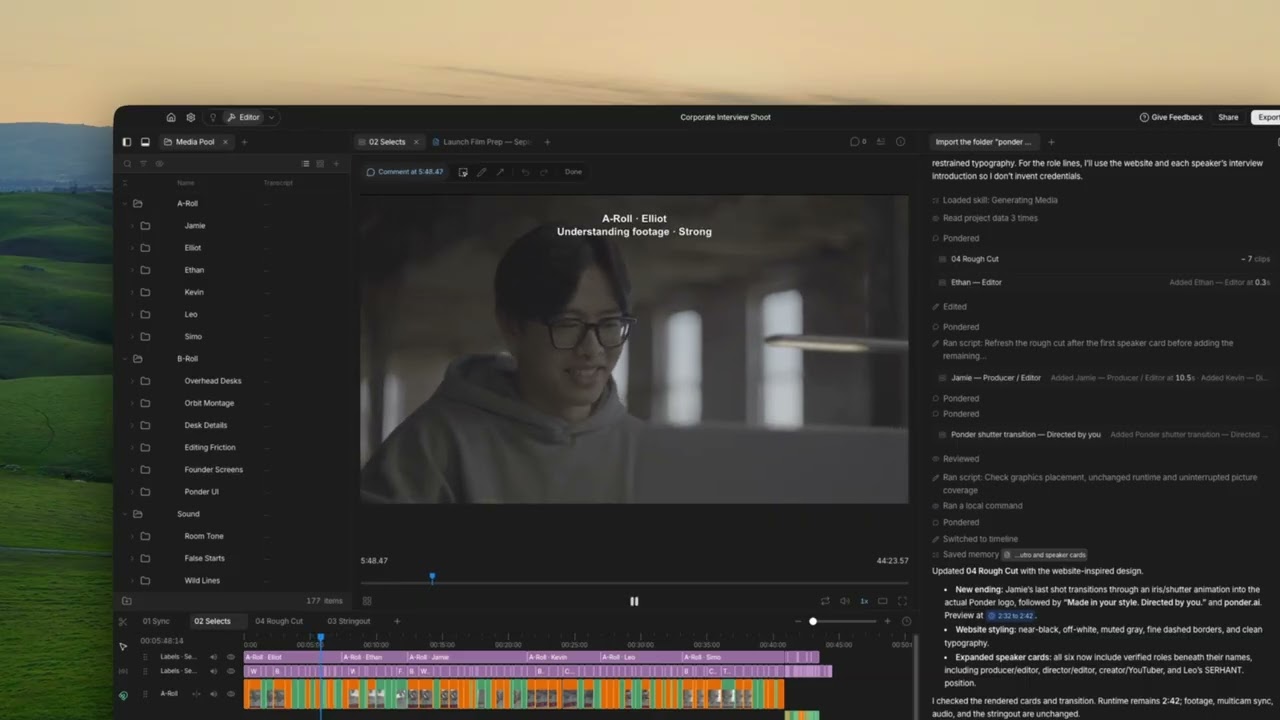
Last year, we went pretty viral on X when a short clip of Ponder cutting a vlog on its own made the rounds. For a lot of people, that was the first time they saw what we’d been building
We started Ponder because editing eats your time in the wrong places. You shoot something you’re proud of, then lose hours scrubbing through clips, syncing cameras and rebuilding the look you made last month, and the creative part gets whatever energy you have left
Ponder AI is an agentic video editor. You bring your footage, describe the video you want, and Ponder makes the cut. Then you watch it and tell Ponder what to change, in plain words or out loud in review mode, and it makes the changes while you stay on the story
Ponder is a desktop app, and you can check on it from your phone or browser too. It edits real footage that you or your creators shot, and it can generate music, photos and video when you need them.
What can you do with Ponder AI?
- Add your footage. Bring in every clip, camera and audio file without sorting them first. Ponder can sync your cameras and audio, set up multicam edits, pull selects and lay out stringouts for you.
- Say what you want. Tell Ponder who the video is for, how long it should be and how it should feel. Type it or just say it, and pick a saved style (yours or a client’s) so the cut matches your look.
- Watch the first cut. Ponder puts the good moments in order on a real timeline you can play. If you’re missing a music track, a photo or an extra shot, ask Ponder to make it.
- Review it like you’d brief an editor. In review mode you talk through your notes and point or scribble on the frame, and Ponder changes only what you asked about.
- Share a link for feedback. Friends or clients can comment on the video from a link, and then Ponder works through their comments so you don’t have to copy and paste them.
- Edit by hand whenever you want. Use the keyboard shortcuts you already know, and drag in ready-made sound effects, motion graphics and text.
- Cut by editing the transcript. Delete words from the transcript and they’re gone from the video, which saves a lot of time on podcasts, interviews and other talking-heavy videos.
- Make versions. Ask for different hooks, lengths and formats from the same footage.
- Export or keep going in your editing app. Render the video, share it, or send the cut to Premiere Pro, DaVinci Resolve, Final Cut Pro, CapCut or iMovie.
You can do all of this from Claude or ChatGPT too, either by connecting your assistant or by running Ponder on the plan you already pay for.
Who is Ponder AI for?
| You are… | Ponder helps you… |
|---|---|
| A creator or vlogger | Turn a full card of clips into a vlog that looks like yours |
| A UGC creator doing brand deals | Meet every deliverable on time and take on more deals without falling behind |
| A brand or marketer | Make UGC ads and test hooks without a reshoot |
| A freelance editor | Keep every client’s style and get through revisions faster |
| A production studio | Edit faster across different clients, with each client’s style saved and ready |
| A wedding or event filmmaker | Sync cameras and get to the highlight film sooner |
| Someone who’s never edited | Make a good video by describing it |
What isn’t Ponder AI?
- It starts from your real footage. Ponder edits what you or your creators shot, so your videos still look like real life. When there’s a gap, it can generate music, photos and video to fill it.
- It doesn’t take over. You choose the story and make the final calls.
- It works with the editing app you already know. If you’d rather finish in Premiere Pro, DaVinci Resolve, Final Cut Pro or CapCut, send the cut over and pick up where Ponder left off.
There are other products called “Ponder”. Ponder AI, at ponder.ai, is the video editor.
What is an agentic video editor?
An agentic editor does the editing itself. You describe the video, and Ponder’s editing agent finds the good shots, builds the timeline and makes the changes you ask for.
What else do people ask about Ponder?
- Is there an AI that can edit my video for me? Yes, that’s what we built. Ponder edits your real footage and makes the cut on a real timeline, and you can still change anything.
- Can AI edit my raw footage into a rough cut? Yes, you drop in every clip and Ponder finds the good moments and puts them in order, then you can refine it by talking to Ponder.
- Do I need to know how to edit? No, you can describe the video and react to the cut, and editors can still take full control.
- Does it work with Premiere Pro, DaVinci Resolve or iMovie? Yes, you can send your cut to Premiere Pro, DaVinci Resolve, Final Cut Pro, CapCut or iMovie.
- Can I use it with Claude or ChatGPT? Yes, you can connect your assistant to Ponder, or run Ponder’s editor on the plan you already pay for.
- Is Ponder AI the same as ponder.ing? No, ponder.ing is a different product, and Ponder AI at ponder.ai is the AI video editor.
Is it free to try?
Yes, there’s a Ponder free trial, so you can drop in footage you already have and describe the video you want. See pricing for plans after that.
If you love it, you can keep going for free by inviting a friend. Click the invite button in Ponder, and your friend gets a free month of Starter, then you get one too once they make and export their first cut.